April 2025
The JARVIS Hype
Over the past few months, I kept seeing videos of people building their own "JARVIS" style AI assistants inspired by Iron Man. Most of the videos looked impressive visually, but a lot of them either relied heavily on cloud APIs or never really explained how the systems actually worked behind the scenes.
At first, I honestly considered just asking someone for their repository and modifying it, but I had a relatively free couple of days and decided it would be more interesting to build my own version from scratch and understand every part of the stack myself.
What started as a simple experiment turned into a full local AI system involving real-time voice processing, local LLM orchestration, macOS automation, live streaming pipelines, WebSocket infrastructure, filesystem tooling, holographic UI rendering, local vector memory, and event-driven backend systems.
The project became much larger than I originally expected, but that is also what made it interesting.
Starting With the Core Interaction Loop
The first thing I focused on was getting the basic interaction cycle working.
┌─────────────────────────────────────────────────────────────┐
│              Core Interaction Loop                          │
├─────────────────────────────────────────────────────────────┤
│                                                             │
│  Voice Input                                                │
│        ↓                                                    │
│  Speech-to-Text                                            │
│        ↓                                                    │
│  Local LLM                                                 │
│        ↓                                                    │
│  Tool Execution                                            │
│        ↓                                                    │
│  Text-to-Speech                                            │
│        ↓                                                    │
│  Voice Response                                            │
│                                                             │
└─────────────────────────────────────────────────────────────┘
Before touching UI or advanced automation, I wanted the assistant to listen continuously, transcribe accurately, generate responses locally, speak naturally, and stream responses in real time.
I specifically wanted the system to run mostly locally instead of depending entirely on external APIs. That meant optimizing around local inference speed, memory usage, streaming latency, GPU acceleration, and asynchronous execution.
The AI Stack
For the language model layer, I used Ollama as the local model runtime. One reason I liked Ollama was how easy it made local model management while still allowing flexibility to swap between models depending on the task.
Some of the models I experimented with included Qwen, Llama, DeepSeek, coding-focused instruct models, and lightweight conversational models. Different models behaved very differently depending on reasoning tasks, tool usage, latency requirements, coding performance, and conversational tone.
One thing I learned quickly is that local assistants are really orchestration systems more than just "one AI model." The actual intelligence comes from how everything is wired together.
Backend Architecture
The backend was built primarily using Python, FastAPI, async WebSockets, event-driven tool routing, and streaming response pipelines.
FastAPI handled WebSocket connections, audio streaming, transcript streaming, backend APIs, live HUD updates, and tool execution endpoints.
The architecture became heavily event-based because multiple systems needed to communicate simultaneously: voice input, live transcription, LLM token streaming, UI updates, filesystem events, voice playback, and tool execution states.
At one point, I realized the project was starting to resemble a miniature operating system more than a traditional chatbot.
Real-Time Speech Recognition
For speech-to-text, I used Faster-Whisper. The biggest priority here was latency. Voice assistants immediately feel unnatural if there is too much delay between speaking, transcription, response generation, and voice playback.
The pipeline eventually looked something like this:
┌─────────────────────────────────────────────────────────────┐
│              Audio Processing Pipeline                        │
├─────────────────────────────────────────────────────────────┤
│                                                             │
│  Microphone                                                 │
│        ↓                                                    │
│  Audio Chunk Stream                                         │
│        ↓                                                    │
│  Faster-Whisper                                             │
│        ↓                                                    │
│  Partial Transcript Streaming                               │
│        ↓                                                    │
│  LLM Processing                                             │
│        ↓                                                    │
│  Streaming Response Tokens                                  │
│                                                             │
└─────────────────────────────────────────────────────────────┘
Streaming partial transcripts in real time made the interface feel significantly more responsive even before the final transcription completed.
Text-to-Speech and Voice System
The voice system became one of the most interesting parts technically. I wanted something inspired by the original cinematic JARVIS voice: calm, intelligent, smooth, slightly synthetic, and low latency.
I experimented with XTTS, Coqui TTS, voice conversion systems, and local voice pipelines. The hardest part was not generating speech itself. The difficult part was synchronization: interrupt handling, response timing, playback buffering, listening state transitions, preventing feedback loops, and maintaining conversational flow.
Even small timing issues made the assistant feel noticeably worse.
macOS-Native Integration
Once the assistant could reliably converse, I started integrating it directly into macOS. This introduced an entirely different layer of engineering challenges.
The backend needed Full Disk Access, Finder automation, Accessibility permissions, AppleScript integration, and native subprocess execution. The backend had to run natively on macOS rather than inside Docker because filesystem operations needed access to the actual host machine.
Once permissions were configured correctly, the assistant could search files, open Finder folders, launch applications, create files/folders, open Cursor projects, execute local commands, and manipulate the filesystem.
One surprisingly difficult problem was natural file search. Initially, the assistant searched too literally. For example, "open Rehan Mohammed resume" might incorrectly search for rehanmohammedresume instead of understanding semantic intent.
To improve this, I implemented tokenized query parsing, fuzzy matching, synonym expansion, case-insensitive matching, file ranking, recent-file prioritization, Spotlight-assisted search, and fallback directory walking. That made interactions feel much more natural.
Frontend and HUD Design
The frontend stack used Next.js, TypeScript, TailwindCSS, Framer Motion, WebSockets, and custom animation systems.
The original UI looked far too much like a developer dashboard, so I eventually redesigned it toward a more cinematic interface. The goal became minimal, holographic, ambient, responsive, and readable.
The interface evolved into a black cinematic background, glowing holographic orb, cyan/blue HUD styling, live transcript streaming, animated listening/thinking states, transparent overlays, subtle graph-style visual effects, and real-time activity updates.
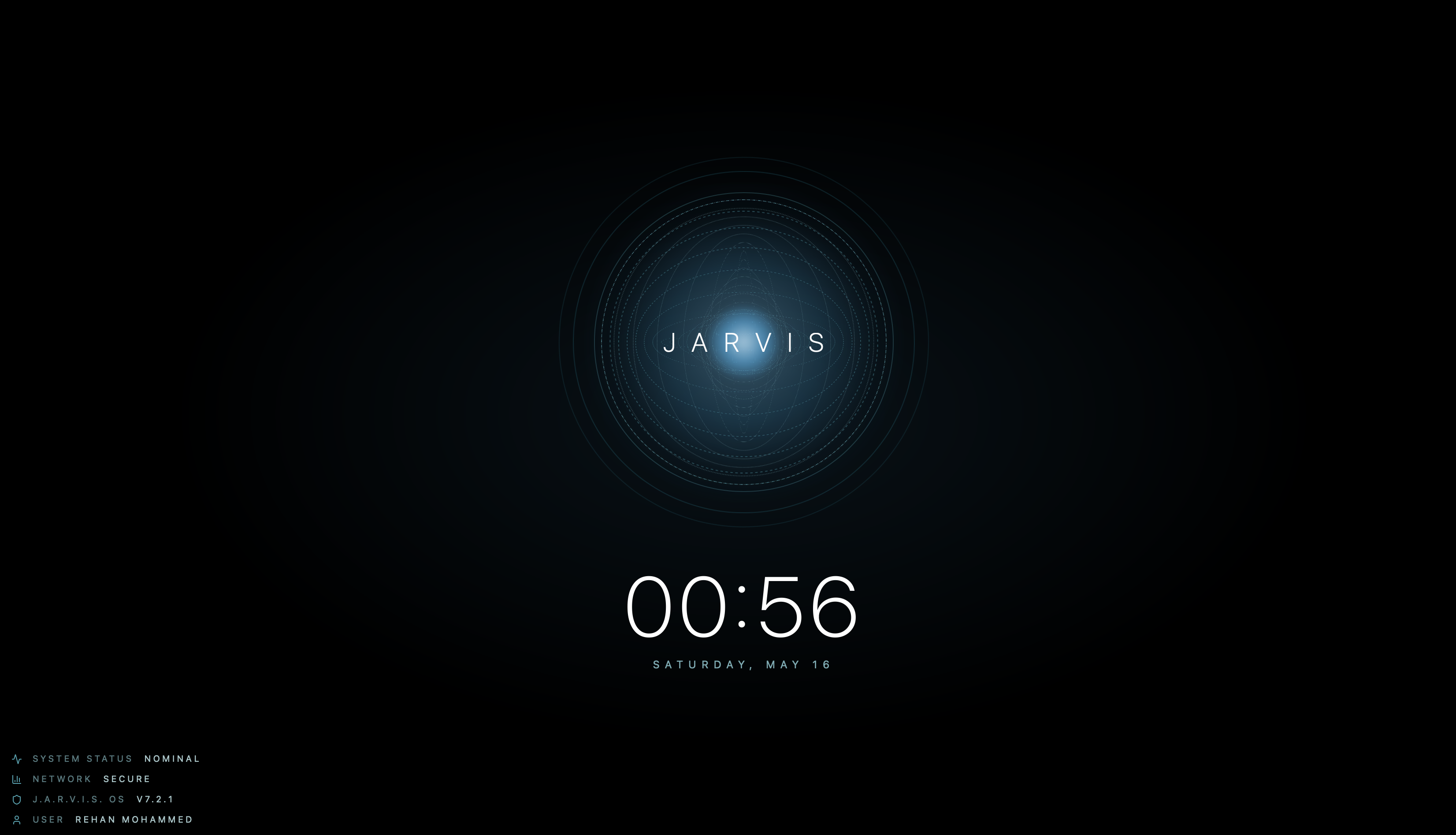
The orb itself became heavily animated using layered particles, pulsing gradients, waveform motion, audio-reactive scaling, smooth interpolation, and holographic glow effects.
One thing I learned quickly is that futuristic interfaces are incredibly easy to overcomplicate. Simplicity ended up being far harder than adding effects.
Performance Optimization
A huge amount of the project eventually became performance engineering. The main bottlenecks included STT latency, TTS startup delay, token streaming speed, WebSocket synchronization, filesystem search speed, frontend rendering, and event orchestration.
I started optimizing async task execution, incremental rendering, response streaming, local caching, file indexing, event batching, and audio buffering. The goal was making the assistant feel instantaneous rather than technically functional. That difference matters a lot in conversational systems.
What I Learned
One of the biggest things this project taught me is that building AI systems is much more about systems engineering than people often realize. The difficult parts are usually orchestration, synchronization, UX flow, state management, latency reduction, and infrastructure reliability, not simply plugging a model into an interface.
I also gained a much deeper appreciation for how powerful local AI has become. Running sophisticated assistants locally is becoming increasingly realistic, especially with optimized inference runtimes and smaller high-performance models.
What It Can Currently Do
At its current stage, the assistant already functions more like a local AI operating system assistant than a normal chatbot.
Right now, it can listen continuously through voice input, transcribe speech in real time, generate responses using local LLMs, respond using a cinematic JARVIS-style voice, search the macOS filesystem intelligently, open files and folders through Finder, launch applications like Cursor, create files and folders locally, stream live transcripts and activity updates to the HUD, maintain conversational context, and display a real-time holographic interface with reactive animations.
A large amount of the engineering effort went into reducing delays, improving responsiveness, and making the interaction feel smooth and conversational instead of robotic.
Over the next couple of weeks, I plan on continuing to automate the system further and expand it with stronger memory systems, smarter autonomous workflows, better file and application management, deeper operating system integration, browser and email integration, improved voice realism, lower latency response pipelines, more advanced holographic UI rendering, and smarter planning and reasoning systems.
The long-term goal is to make the assistant feel less like a voice tool and more like an intelligent operating layer sitting on top of the computer itself.
Final Thoughts
What started as a small side project turned into one of the most technically interesting systems I have worked on recently.
It taught me that building AI assistants is much more about orchestration, infrastructure, latency, UX, and systems engineering than simply connecting a model to a microphone.
There is still a lot I want to improve, but building this project gave me a much deeper understanding of how modern AI assistants actually work beneath the surface.